
Best AI Coding Tools in 2026 (By What You Actually Need)
There's no single best AI coding tool — there's the right one for your job. Here's a clear-eyed guide to the categories and top picks for speed, agents and control.
There is no single best AI coding tool in 2026. There's a best tool for the specific job in front of you, and the reason people end up disappointed is that they picked the most-hyped one instead of the one that fits the work. Want autocomplete in your editor? Copilot. Want an agent that edits across files? Cursor. Want a prototype live this afternoon? Lovable or v0. Want a system you can still reason about — and trust — after AI has generated thousands of lines? That's a different category entirely, and most tools don't compete there at all.
So the honest version of "best AI coding tools in 2026" is a routing question, not a leaderboard. Every serious tool now runs on a frontier model good enough that the generated code usually compiles and usually runs. The model stopped being the differentiator a while ago. What separates these tools is what you're left holding after the AI is done — how much you have to verify by hand, how coherent the output stays as the codebase grows, and what it costs you in tokens and rework to keep going.
This is a founder-to-founder breakdown organized by what you actually need, not by brand. I'll be specific about where each tool genuinely wins, fair to the competition, and direct about where GitMir is the right call and where it's the wrong one. Let's route you to the correct tool.
The one question that picks your tool
Before any feature comparison, answer this: at what stage is your project, and what's the bottleneck right now?
Almost every bad tool choice traces back to a mismatch between the tool's center of gravity and your actual stage. A founder who needs to validate an idea this week doesn't need an architecture platform. A team scaling a 40,000-line app doesn't need a prototype generator that regenerates the whole file every time you tweak a button. The tools are not interchangeable, and pretending they are is how you end up rewriting everything in month four.
Here's the lens that survives contact with a real, scaling codebase. The more powerful the generator, the bigger the verification surface it hands back to you. Autocomplete hands you one line to check. An agent hands you a 400-line diff. A full-app generator hands you an entire codebase you didn't write and can't fully see. Generation speed is solved. The actual constraint in 2026 is the speed of trusting the output, and that's an architecture problem, not a model problem.
The question that picks your AI coding tool isn't "which writes the best code." By now they all write code that runs. It's "how much of my week goes to verifying what it produced — and does that number grow or shrink as the codebase does?"
Keep that in mind through every section below.
If you need: speed without losing your flow
The job: You're a working engineer writing real code in a real editor, and you want the AI to remove typing friction without taking the wheel.
The pick: GitHub Copilot.
Copilot is the conservative default, and it earned that. It's native to VS Code and JetBrains, the latency is invisible, and its blast radius is exactly one suggestion. For boilerplate, test scaffolds, and finishing a line you already see in your head, nothing else has lower friction. A bad suggestion costs you one keystroke. You're never staring at a sprawling change wondering what it touched.
The trade-off is leverage. Copilot keeps you in control at the keystroke, which means it never helps with the expensive part: keeping a growing system coherent. It autocompletes; it doesn't reason about your architecture. That's a feature when you know exactly what you're building and a limitation when you don't.
This matters more than the marketing admits. Research from McKinsey on generative AI in software engineering found that while AI tools speed up coding, developers still spend significant time reviewing and reworking the output, and the gains depend heavily on keeping a human in the loop to verify what the tools produce. Copilot's design quietly aligns with that reality: small suggestions, small risk, human always in the loop. If you want maximum safety per suggestion, this is it.
When Copilot is the wrong call
- You need cross-file changes, not line completions.
- You're a non-engineer — Copilot assumes you're already writing code.
- Your problem is architectural drift, which Copilot has no opinion about.
If you need: an agent that works across your codebase
The job: You have a real repo and you want to say "add rate limiting to the API and update the tests," then review the result instead of writing it.
The pick: Cursor (or Copilot's agent mode, increasingly comparable).
Cursor is the tool that made agentic coding feel normal. It indexes your repo, plans multi-file changes, and hands you a diff to approve. The leverage jump over autocomplete is real — you're operating at the level of intent, not syntax. For a competent engineer who can read a diff critically, it's a genuine multiplier on a codebase you already understand.
The catch is the one from the lens above. Verification doesn't scale the way generation does. The first 400-line diff of the day gets a careful review. The sixth gets a skim. Cursor moves the control point from the keystroke to the diff, which is more power and more to audit, and the audit is where the hidden cost lives. The agent will confidently produce something plausible that subtly violates an assumption three files away, and catching that is on you.
Cursor shines when you have:
- An existing, reasonably structured codebase the agent can reason about.
- Engineers who treat the diff as a code review, not a rubber stamp.
- Tasks that are mechanical-but-multi-file — refactors, wiring, test coverage.
It strains when the codebase is large and loosely structured, because the agent's context is finite and its plan is only as good as the structure it can see. I wrote a deeper head-to-head in Cursor vs Copilot vs GitMir and rounded up the strongest Cursor alternatives if Cursor isn't fitting your stage.
If you need: a working prototype this afternoon
The job: You have an idea, no time, and you need something clickable to show a user, an investor, or yourself — today.
The pick: Lovable, v0, or Replit Agent.
This is the category that genuinely changed what's possible for non-engineers and time-starved founders. Describe an app, get a running app. v0 is exceptional at UI — describe a screen, get clean, componentized front-end you can drop into a Next.js project. Lovable goes further toward full-stack, spinning up a database and auth so the thing actually works end to end. Replit Agent owns the whole loop: it provisions the environment, writes the code, and deploys, all in the browser, which is hard to beat for "I just want it live."
For validation, these tools are the correct answer and I won't pretend otherwise. The fastest way to learn whether an idea has legs is to put a working version in front of a human, and nothing does that faster.
Prototype generators are spectacular at going from zero to demo and structurally indifferent to what happens after. They optimize for the first 80%, which is also the easy 80%. The expensive part — the part that decides whether you have a business or a rewrite — starts exactly where their incentive ends.
The cliff you hit next
Here's the pattern. It's so common it has a name now: the prototype-to-production wall.
- The demo works. You get the green light. Real users show up.
- You need a change the generator didn't anticipate. It regenerates a chunk of the app, and now something that worked yesterday is broken.
- The code is real React and real SQL, but you didn't write it, no one designed the architecture, and there's no map of how it fits together.
- Every new feature gets slower to add, not faster, because each change risks the ones before it.
This is the hidden cost of vibe coding, and it's not a knock on the tools. It's a category boundary. Prototype generators are validation instruments. Asking one to be your production platform is asking a paper map to be a GPS. For more on choosing your first tool at this stage, see the best AI tools for startups.
If you need: a no-code app without writing code
The job: You're non-technical, you want a real internal tool or app, and you'd rather configure than code.
The pick: Bubble (mature) — but understand the ceiling.
Bubble has spent over a decade making visual app-building work for non-engineers, and for a class of internal tools, marketplaces, and CRUD apps it's a legitimate way to ship without code. The visual editor is its strength and its limit. You're building inside Bubble's model of the world, so you move fast inside the lines and hit a wall the moment you need to step outside them.
Two real costs to weigh: performance at scale, since the abstraction has overhead, and lock-in, since your app lives in Bubble's runtime and getting out means rebuilding. For the right project those are acceptable. For a product you intend to scale and own outright, they compound. We did a full breakdown in Bubble vs GitMir if you're weighing visual-but-locked-in against visual-but-it-generates-real-code.
If you need: AI speed AND a system you can still control
The job: You want AI to do the heavy lifting, but you're building something real — something you'll maintain, scale, hand to other engineers, and bet a business on. You can't afford a codebase no one can reason about.
The pick: GitMir.
This is the category the leaderboard usually misses, and it's the one that matters most once you're past validation. Every tool above puts the control point after generation. You autocomplete then check, the agent generates then you review the diff, the prototype tool builds then you discover what it built. GitMir moves the control point before generation.
You model the product first: visual architecture — modules, data flows, APIs, business logic — laid out as a system you can see. Then AI generates structured, editable objects inside that architecture, not freeform code sprayed across files. Because the AI is constrained to the structure you defined, there's less to audit afterward, the output stays coherent as it grows, and you reuse components instead of regenerating them. Same frontier model as everyone else, different leash.
Three consequences fall out of that design:
- Validation before deploy. Because generation happens inside a defined architecture, the system can check the output against that architecture before it ships, instead of you finding the violation in production. (More on the mechanics in how to validate AI-generated code.)
- Reusable components, not regeneration. You build a piece once and reuse it. A button change doesn't trigger a full-file rewrite, which is exactly the failure mode that breaks prototype-generator codebases.
- ~15x fewer LLM tokens than ad-hoc prompting. When the model generates into a structured architecture instead of re-deriving context from a sprawling prompt every time, you stop paying to re-explain your app on every request. Token cost is a real line item now — see how to reduce AI token costs for the breakdown.
Where GitMir is the wrong call
I'll be as direct here as everywhere else. Don't reach for GitMir to autocomplete a function in an existing repo — that's Copilot's job. Don't use it for a throwaway weekend demo you'll delete Monday — a prototype generator is faster to zero-to-demo. GitMir earns its keep when the thing you're building has to survive contact with real users, real scale, and real teammates. If you're validating and might throw it away, validate cheaply first.
The structured comparison
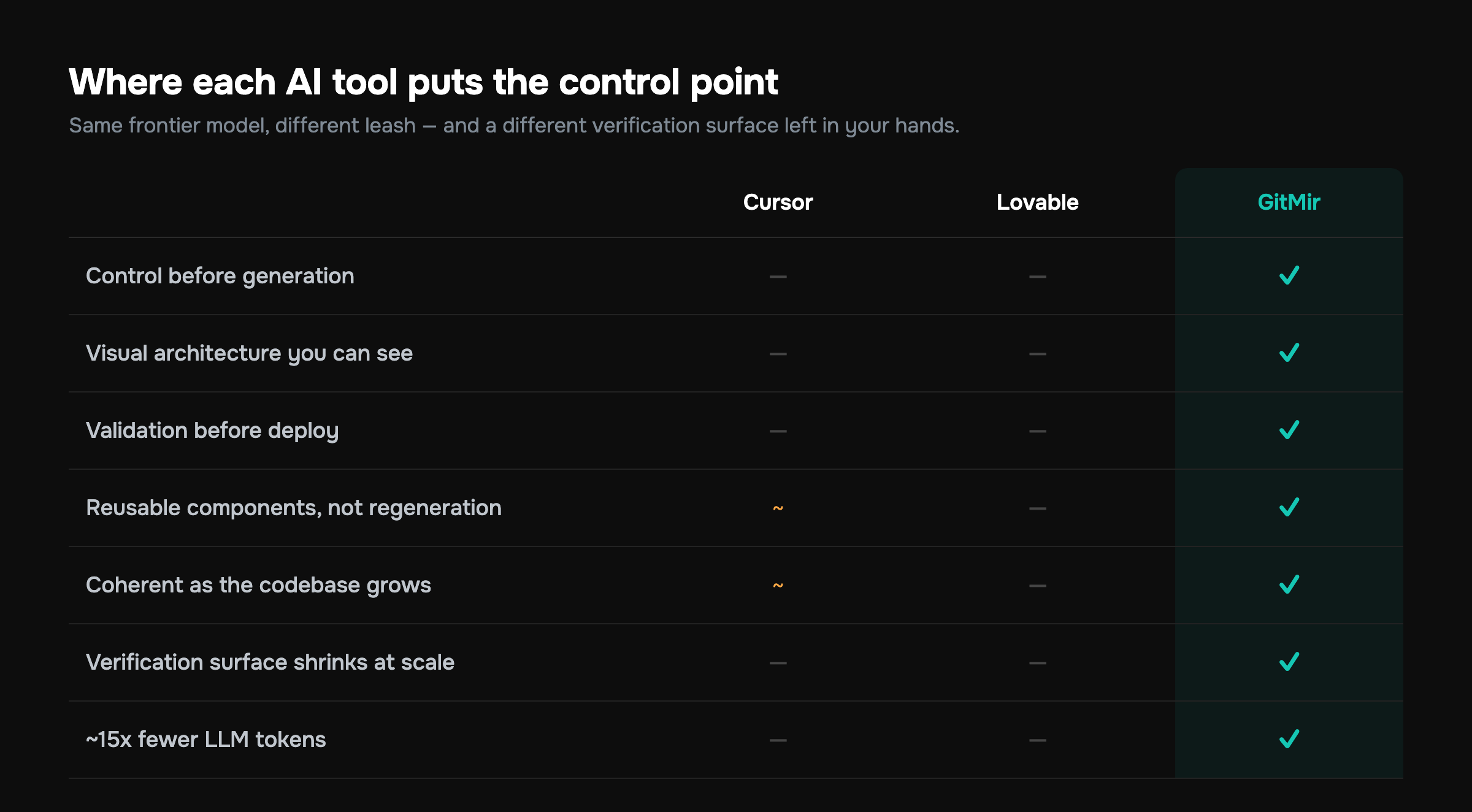
Here's the whole landscape on one axis — where each tool puts the control point, and what you're left holding:
| Tool | Best for | Control point | What you verify | Watch out for |
|---|---|---|---|---|
| Copilot | In-editor speed | Keystroke | One suggestion | No architectural leverage |
| Cursor | Agentic edits in a real repo | The diff | Multi-file changes | Verification doesn't scale |
| v0 | UI / front-end prototypes | After generation | A generated screen | Front-end only |
| Lovable | Full-stack prototypes | After generation | A generated app | Prototype-to-prod wall |
| Replit Agent | Zero-to-deployed in browser | After generation | The whole loop | Same wall, plus lock-in |
| Bubble | No-code apps for non-engineers | Visual config | Behavior, not code | Scale ceiling + lock-in |
| GitMir | Real systems built with AI | Before generation | The architecture, once | Overkill for throwaway demos |
The pattern is the takeaway. Read it left to right: the tools that generate the most also hand you the most to verify, except the ones that move the control point earlier. That's the whole game in 2026. Not who generates best, but who shrinks your verification surface instead of growing it.
Don't ignore the cost of bad AI code
There's a second axis that rarely makes the comparison and absolutely should: what AI does to code quality over time.
Research from Google's DORA program, which studies engineering performance across thousands of teams, has found that adopting AI assistants can correlate with reduced delivery stability and more rework when it isn't paired with strong practices — the opposite of the consolidation a healthy codebase shows. In plain terms: AI tools, used without structure, tend to produce more code that's redundant, repeated, and quickly rewritten. That's not a productivity gain. That's debt arriving faster.
This is the strongest argument for caring about where the control point sits. A tool that generates freely and lets duplication pile up is borrowing against your future velocity. A tool that generates into a structured architecture with reusable components is the structural answer to exactly the problem this research measured. If your codebase already shows the symptoms, here are the signs an AI codebase is becoming unmaintainable — read them before they become a rewrite.
Speed that creates debt isn't speed. It's a loan. The interest shows up the first time a "quick" change breaks three things you forgot the AI had touched.
A decision tree you can actually use
Skip the spreadsheet. Answer these in order and stop at your first yes:
- Am I a non-engineer who just wants a clickable demo today? → Lovable, v0, or Replit Agent.
- Am I a non-engineer building an internal tool I'll configure, not code? → Bubble.
- Am I an engineer who wants faster typing in my editor? → Copilot.
- Am I an engineer who wants an agent to make multi-file changes in a repo I understand? → Cursor.
- Am I building something real that I'll maintain, scale, and hand to a team — and I want AI speed without losing control of the system? → GitMir.
Most teams don't live in one box. The realistic 2026 stack is layered: Copilot for in-editor flow, a prototype generator to validate an idea fast, and then — the moment validation succeeds and you're committing to build — a platform that gives you visual architecture and validated generation so the thing you scale isn't a pile of code no one can see. The mistake isn't using the prototype tools. It's not moving off them when the job changes. The whole point of AI-native development is matching the tool to the stage instead of forcing one tool across all of them.
What "productivity" actually means here
The word "productivity" gets thrown around as if it means "lines per hour." It doesn't. McKinsey's work on generative AI and developer productivity found that the gains from AI tools are real but highly uneven — concentrated in well-scoped, lower-complexity tasks, and far smaller (sometimes negative) on complex, unfamiliar work without the right guardrails. The honest reading: AI makes the easy parts faster and can make the hard parts messier if there's no structure holding the output together.
That's the entire thesis of routing by need. Productivity isn't choosing the tool that generates the most. It's choosing the tool that generates the most of what you can keep — code that coheres, components you can reuse, and an architecture you can still reason about when the codebase is ten times bigger. The fastest path there is not always the fastest demo. It's the one where verification shrinks as you scale instead of swallowing your week.
Your next step
If you only take one thing from this: route by your stage, not by the hype. Pick the tool whose center of gravity matches the bottleneck in front of you, and switch deliberately when the job changes.
If you're past validation and building something you intend to keep, the question gets concrete. What does it cost you to keep generating code you have to fully verify by hand, and what would it save to generate inside an architecture instead? Put real numbers on it with the ROI calculator, see how the visual-architecture approach actually works on the product page, line GitMir up against your current tool on the comparison page, and try it free in the GitMir IDE.
Pick the tool that fits the work. When the work gets serious, pick the one that keeps the system yours.
See it on your own numbers
GitMir gives you visual architecture, reusable components and up to 15× fewer LLM tokens. Try the visual IDE for Claude Code free, or estimate your savings first.
Start free in GitMir IDE → Calculate your ROI →Frequently asked questions
What is the best AI coding tool in 2026?
There isn't a single best one — there's a best tool per job. Copilot wins for in-editor autocomplete, Cursor for agentic multi-file edits, Lovable and v0 for fast prototypes, Bubble for no-code apps, and GitMir for building real systems where AI generates inside a controlled visual architecture you can still reason about and scale.
Is Cursor better than GitHub Copilot?
It depends on the job, not on which is "better." Copilot is stronger for low-risk, in-editor autocomplete with the smallest blast radius. Cursor is stronger for agentic, multi-file changes in a repo you already understand. The trade-off: Cursor's leverage comes with a bigger diff to verify, and that cost grows as your codebase does.
Are AI coding tools actually making developers more productive?
Yes, but unevenly. Research from McKinsey found AI gains concentrate in well-scoped, simpler tasks and shrink — sometimes going negative — on complex work without guardrails. Studies of AI-assisted codebases also show these tools can increase code churn and duplication. Real productivity means generating code you can keep and reuse, not just generating more lines faster.
Which AI tool is best for non-technical founders?
For a clickable demo today, use Lovable, v0, or Replit Agent — describe your app and get a running one. For a configurable internal tool, Bubble fits. When you move past validation to something you'll scale and maintain, shift to a platform like GitMir that generates real, editable code inside a visual architecture instead of locking you into a runtime.
How do I avoid the prototype-to-production wall with AI tools?
Use prototype generators only for validation, then migrate deliberately the moment the idea proves out. The wall appears because tools like Lovable and v0 optimize zero-to-demo and stay indifferent to architecture. Building inside a defined visual architecture — with reusable components and validation before deploy — is the structural fix, since changes stop breaking unrelated parts of the app.
Do AI coding tools reduce or increase technical debt?
Used without structure, they tend to increase it — industry research documents rising code churn and duplication coinciding with AI assistant adoption. The deciding factor is where the control point sits. Tools that generate freely accumulate redundant code; tools that generate into a structured architecture with reusable components attack that debt directly instead of compounding it.

Related articles

Cursor vs Copilot vs GitMir: Which AI Coding Tool Keeps You in Control?
Cursor and Copilot make you faster at writing code. GitMir makes your whole system visible and controllable. Here's how they compare — and when you need more than autocomplete.

Cursor Alternatives: 6 Options for Teams Who Need Control
Cursor is a great AI editor, but it's not the only — or always the right — choice. Here are six alternatives, what each is best at, and when you need more than an editor.
GitHub Copilot Alternatives: Beyond Autocomplete
Copilot is excellent autocomplete — but autocomplete has a ceiling. Here are the alternatives for teams who need multi-file edits, agents, or full architectural control.