
Best AI Tools for Startups Building Software
Startups need to ship fast without building a mess they'll pay for later. Here are the AI tools worth using at each stage — and how to avoid the scaling trap.
If you're a startup founder asking which AI tools to build your software with, here's the blunt answer first. There is no single best AI tool for startups, and the ones that win you a demo are usually not the ones that survive your first real users. The right stack is two or three tools chosen for the stage you're in: idea, prototype, or product. The expensive mistake is using a speed tool where you needed a structure tool. Get that wrong and your six-week head start turns into a six-month cleanup bill.
For most early-stage teams the practical answer looks like this. Use v0 or Lovable to throw up a frontend and validate a design fast. Bring in Cursor or GitHub Copilot the moment a real engineer is touching the codebase. Lean on Replit Agent for zero-setup full-app spikes, reach for Bubble for internal no-code tooling, and use GitMir when you want AI to generate software inside a visual architecture you control rather than spraying code into a repo and hoping it stays coherent. None of these is universally "better." They optimize for different points on the speed-versus-control curve, which is the only axis that actually matters when you're a startup with no slack to absorb rework.
This isn't a ranked listicle. Ranking AI tools 1-through-10 ignores the only variable that decides your outcome: what are the stakes of the thing you're building, and how much of the AI's output can you afford to not look at? That's the lens for everything below. We'll go stage by stage, name the right tool for each, be honest about where each one (including ours) is the wrong choice, and end with how to keep the velocity without inheriting the debt.
The framework: stakes decide the tool, not features
Forget feature checklists. Every AI tool for startups is a bet on one trade-off: how much chaos you accept in exchange for how much speed. Map your tools on a single axis and the whole market suddenly makes sense.
- Maximum speed, minimum control — prompt-to-app generators (Lovable, Replit Agent, v0). Type a sentence, get a running thing. The thing is opaque, and it gets harder to steer the bigger it grows.
- Balanced, human-in-the-loop — agentic IDEs (Cursor, Copilot agent mode). Fast, but a skilled engineer reviews every diff. Control is manual. It lives in your team's vigilance and runs out when you're tired.
- Maximum control, structured speed — architecture-first platforms (GitMir). You model the system, AI generates objects inside that model, and the structure is what keeps output coherent as it scales. Not your attention span.
The expensive startup mistake isn't picking a "bad" AI tool. It's picking a high-speed, low-control tool for work that needed structure — and discovering the cost only after the prototype quietly became the product.
Why does this beat a ranked list? Because the same tool that's perfect for a landing page is a liability for a billing system, and the same tool that feels like overkill for a weekend hack is exactly what saves you when that hack gets paying users. "Best" is a function of stakes. Low stakes (throwaway demos, design exploration, internal one-offs) let you cash in pure speed. High stakes (real money, real customer data, code another engineer will maintain in a year) push you hard toward control. Keep that axis in your head for the rest of this piece.
Why AI tooling is now table stakes for startups
A quick reality check before the recommendations, because some founders still treat AI coding as optional or "cheating." It isn't optional anymore. It's the baseline your competitors already operate from.
Research from McKinsey on generative AI and developer productivity found that AI-based coding tools can meaningfully speed up common development tasks, with the largest gains on routine work and far smaller gains on complex, context-heavy problems. That's not an edge anymore; the tooling is the baseline. But McKinsey's own caveat is the quieter, sharper point. The productivity uplift shows up only when experienced engineers stay in the loop to review output, and it can evaporate, or go negative, on unfamiliar or high-complexity code. Translation: everyone is using these tools, and the speed is real but uneven. The gap between adoption and reliable, maintainable output is exactly the gap this article is about. Speed is solved. Coherence is not.
For a startup, the implication is sharp. AI tooling won't differentiate you, because everyone has it. What differentiates you is whether your AI-built software is still extendable when you hit your first scaling wall, or whether you have to rebuild it the month before your Series A. The tool choice is really a bet on that future moment.
Stage 1: Validate the idea — frontend and prototype generators
Before you've written a line of backend, you need to know whether anyone wants the thing. This is the highest-speed, lowest-stakes moment in your company's life, and it's exactly where prompt-to-UI tools earn their keep.
v0 — fast, clean React UI from a prompt
Vercel's v0 is the sharpest tool for one specific job: generating production-grade frontend components and layouts from a text prompt or a screenshot. It outputs React and Tailwind that's genuinely close to what a competent frontend engineer would write, and it slots straight into a Next.js project. For a founder building a pitch-deck demo or testing three landing-page directions in an afternoon, it's hard to beat.
Where it stops: v0 is a frontend tool. It has no opinion about your data model, your business logic, or your API. You get a beautiful shell and an empty backend, and the moment you need state that survives a refresh you're on your own.
Lovable — full-app prototypes for non-engineers
Lovable goes further than v0. It generates a working full-stack app from conversation: frontend, backend, database wiring. For a non-technical founder it can feel like magic, and as a validation tool it's legitimately powerful. You can put a clickable, data-backed prototype in front of users in a day.
The catch is the one every prompt-to-app tool shares: control degrades as the app grows. The first three features are euphoric. Feature twelve breaks feature four, and because you can't see the architecture, you can't reason about why. We wrote a full comparison in Lovable vs. GitMir, but the short version is that Lovable optimizes for getting to a prototype, not for living with a codebase. Know which one you actually need.
Replit Agent — zero-setup, full-app spikes
Replit Agent wins when you want a running app with literally zero environment setup. No local toolchain, no deploy config, it builds and hosts in the browser. For hackathons, internal spikes, and "can we even do this?" experiments, it removes every excuse. As a learning and exploration environment it's excellent.
The same warning applies. A Replit Agent app is fast to start and opaque to scale. Treat its output as a question answered, not a foundation poured.
Prototype tools are answer machines, not foundations. Their job is to tell you whether the idea is worth building properly — and then to be thrown away without regret. The danger is never the prototype. It's the prototype that nobody decided to throw away.
Stage 2: Build it for real — agentic IDEs
The moment a real engineer is editing a real codebase, you've left prompt-to-app territory. Now you want tools that accelerate a human who understands the system, not tools that replace that understanding.
GitHub Copilot — the conservative default
Copilot is the correct boring choice for inline assist inside an existing codebase. Its center of gravity is autocomplete plus a chat sidebar, and the small blast radius is a feature, not a limitation: a bad suggestion is one keystroke from gone. It lives natively in VS Code, JetBrains, and Neovim, so there's no new mental model. For a startup with a couple of engineers shipping daily, it's the lowest-friction productivity win available.
Its limit is that it has no model of your system. It pattern-matches open files, so it'll cheerfully suggest a duplicate of a helper that already exists two folders over. See GitHub Copilot alternatives if that ceiling is biting.
Cursor — agentic multi-file edits
Cursor is Copilot's more ambitious sibling: an AI-first IDE built for agentic, multi-file edits. Describe a change and it reaches across the codebase to make it. For a competent engineer doing a refactor or wiring a feature through several layers, it's a genuine force multiplier, and a real productivity unlock for a small team punching above its weight.
The cost is that the blast radius is now large, and the only thing standing between a confident-but-wrong agent and your main branch is your engineer's review stamina. That's fine on a good day. The question startups should sit with is what happens on the bad days, when the same engineer is shipping at 1am before a launch. We dig into the trade-offs in Cursor alternatives.
Here's the honest comparison of these stages, side by side:
| Tool | Best for | Speed | Control source | Where it breaks |
|---|---|---|---|---|
| v0 | Frontend / UI prototypes | Very high | You discard it | No backend, no data model |
| Lovable | Full-app validation (non-eng) | Very high | None visible | Coherence decays as it grows |
| Replit Agent | Zero-setup full-app spikes | Very high | None visible | Opaque to scale |
| Copilot | Inline assist in real code | High | Your review (small scope) | No model of your system |
| Cursor | Agentic multi-file edits | High | Your review (large scope) | Review fatigue on big diffs |
| Bubble | Internal no-code tools | Medium | Visual but proprietary | Lock-in, custom logic limits |
| GitMir | AI inside controlled architecture | High | The architecture itself | Wrong for throwaway demos |
Stage 3: Make it survive — architecture-first AI
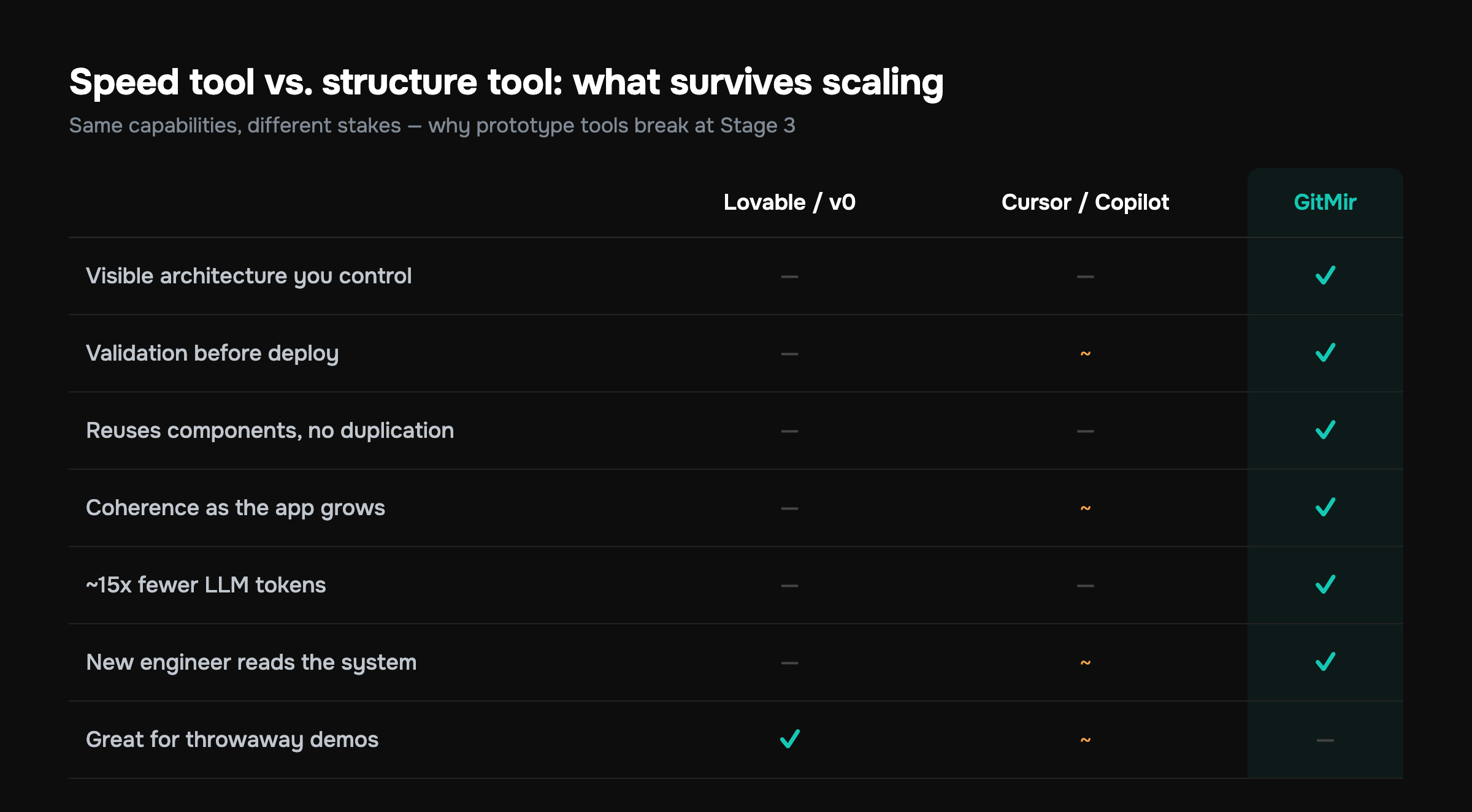
This is the stage almost every startup underestimates, and it's where the speed-versus-control trade-off comes due. Your prototype found product-market fit. Now real users, real money, and real data are flowing through code that was generated to win a demo, not to be maintained. The same velocity that got you here starts working against you.
This is the gap GitMir is built for, so let me be specific rather than salesy. The premise is that the problem with AI-generated code isn't the code quality of any single file. Modern models write fine functions. The problem is coherence at scale. AI has no durable model of your system, so every prompt is a fresh guess, duplication accumulates, and nobody (human or model) can hold the whole thing in their head.
GitMir inverts the order. Instead of prompting code into a repo and reverse-engineering the architecture later, you build the visual architecture first — modules, data flows, APIs, business logic — and AI generates structured, editable objects inside that architecture. A few consequences that matter for a startup:
- Validation before deploy. Generated objects are checked against the architecture you defined, so "it compiled and looked right" stops being your quality bar. You catch structural mistakes before they ship, not in production.
- Reusable components. Because the system is modeled, the AI reuses what exists instead of regenerating a fourth slightly-different version of the same helper. That's the duplication tax, gone.
- Roughly 15x fewer LLM tokens than ad-hoc prompting, because the model operates on structured objects with known context instead of re-deriving your whole codebase from scratch every prompt. For a startup watching its burn, token cost is real money. There's a breakdown at reduce AI token costs.
- The architecture stays visible. When you onboard your second engineer, they read the system instead of archaeology-ing a repo. See how the visual model works on the product page.
The tools that win you a demo and the tools that survive your first scaling wall are usually not the same tools. The trick is knowing which stage you're in before you commit — and not letting the prototype silently become the product.
If you've already got a vibe-coded prototype and you're staring down exactly this transition, we wrote a whole playbook: scale a vibe-coded prototype to production.
What about no-code? Bubble and the internal-tools question
Bubble deserves a mention because it solves a different problem than everything above. It's a mature visual no-code platform for building web apps without an engineer. For a startup that needs an internal admin panel, a simple CRUD tool, or an ops dashboard fast, Bubble is often the correct answer. Not because it scales beautifully, but because the thing you're building genuinely never needs to.
Be clear-eyed about the boundary, though. Bubble trades flexibility and ownership for speed. Complex custom logic gets awkward, performance can suffer at scale, and you're building inside a proprietary platform you don't control. Use it for tools that are allowed to stay simple. Don't use it for the core product that has to differentiate you. We compared the philosophies directly in Bubble vs. GitMir.
Beyond coding: the rest of the startup AI stack
Software is the spine, but "AI tools for startups" is broader than your IDE. A few categories worth a deliberate choice rather than defaulting to whatever's loudest:
- Reasoning and assistance models — Claude, GPT, Gemini for everything from drafting specs to debugging. Pick based on your actual workload; the providers leapfrog each other constantly, so avoid hard coupling.
- Design and assets — Figma's AI features and generation tools for mockups and marketing visuals, which feed straight into your prototype stage.
- Customer support and ops — AI support agents and workflow automation, valuable but worth gating behind real volume so you're not maintaining a chatbot before you have customers.
- Analytics and growth — AI layers on product analytics that surface what's working without a dedicated data hire.
The discipline here is the same one as with coding tools: each addition is a dependency you'll maintain. Adopt for a job you can name, not because it's the tool everyone's posting about this week.
A realistic AI tooling stack by stage
To make this concrete, here's what a sensible stack of AI tools for startups looks like as one company grows. Yours will differ. The shape is the point.
- Pre-PMF (0 to validation). v0 or Lovable for prototypes, a reasoning model for specs and copy, Bubble for any internal tooling. Goal: answer "does anyone want this?" as cheaply as possible. Optimize for speed; expect to throw it away.
- Early product (first paying users). A real codebase with Copilot or Cursor accelerating your first engineers, plus architecture-first tooling like GitMir for the parts that carry money or data. Goal: ship features without poisoning the foundation. Optimize for control where stakes are high, speed where they aren't.
- Scaling (Series A and beyond). Architecture-first development becomes the spine because team coherence now matters more than individual velocity, agentic IDEs handle day-to-day edits, and the prototype tools are retired or quarantined to genuine throwaways. Goal: every engineer can reason about the whole system.
The founders who get burned are the ones who never graduate between stages. They let the Stage 1 prototype tool keep running the Stage 3 business because it was working "well enough" until, suddenly and expensively, it wasn't.
How to choose, in one decision
When you're staring at a tool and not sure, ask one question. If the AI is confidently wrong here, how much does it cost me, and would I even notice? Cheap-and-visible failures, like a prototype layout or an internal tool, mean you take the speed. Expensive-and-invisible failures, like billing, auth, or anything touching customer data, mean you take the control, every time. That single question routes you correctly far more often than any feature comparison.
For a fuller, stage-agnostic breakdown of every major option, we keep an up-to-date guide at best AI coding tools 2026, and a direct feature-by-feature view at compare.
Common mistakes startups make with AI tools
The failures are predictable, which means they're avoidable:
- Confusing a prototype with a foundation. The single most expensive error. The prototype's job was to validate, not to scale. Decide explicitly to throw it away.
- Buying speed where you needed structure. Using a prompt-to-app tool for your core product because it was fast at the start. The bill arrives later, with interest.
- Ignoring token economics. Ad-hoc prompting against a growing codebase burns tokens re-deriving context every call. At startup scale that's a real line item, not a rounding error.
- Over-tooling. Adopting eight AI tools before you have eight problems. Every tool is maintenance. Add them when a job demands it.
- No review discipline on agentic edits. Letting a multi-file agent merge without a human who understands the change. Speed without a gate is just deferred debugging.
Next step
If you're early, the right move is to be deliberate about stages: cash in speed while stakes are low, then graduate to structure before your prototype quietly becomes your product. The tools above all have a place. The skill is matching the tool to the stakes, not chasing whichever one is loudest this quarter.
If the part that worries you is the graduation — keeping AI velocity without inheriting the coherence and token debt — that's exactly what GitMir is built to solve. Put real numbers on it and calculate your ROI, see how AI building inside a controlled visual architecture actually works on the product page, or try the GitMir IDE free to see where it fits your stage. Build fast. Just make sure what you're building is still standing when the users show up.
See it on your own numbers
GitMir gives you visual architecture, reusable components and up to 15× fewer LLM tokens. Try the visual IDE for Claude Code free, or estimate your savings first.
Start free in GitMir IDE → Calculate your ROI →Frequently asked questions
What are the best AI tools for startups building software?
The best AI tools for startups are stage-specific: use v0 or Lovable for fast prototypes, Cursor or GitHub Copilot once a real engineer is in the codebase, Replit Agent for zero-setup spikes, Bubble for internal no-code tools, and GitMir when you need AI generating code inside a controlled visual architecture that survives scaling.
Are AI coding tools actually worth it for an early-stage startup?
Yes, but as table stakes rather than an edge. Industry research shows the large majority of developers already use or plan to use AI tools, so they no longer differentiate you. What differentiates you is whether your AI-built software stays maintainable when you hit your first scaling wall instead of needing a costly rebuild.
Can I build my whole startup product with no-code tools like Bubble?
For internal tools, admin panels, and simple CRUD apps, yes — Bubble is often the correct choice. For your core differentiating product, be cautious: no-code trades ownership and flexibility for speed, complex custom logic gets awkward, and you're locked into a proprietary platform. Use no-code where the thing genuinely never needs to scale.
How do I move from a vibe-coded prototype to production software?
Stop adding features to the prototype and treat the transition deliberately. Move the architecture into something visible and validated — model your modules, data flows, and APIs first, then let AI generate inside that structure with validation before deploy. This converts an opaque demo into a system your team can actually reason about and extend safely.
Which AI tool uses the fewest tokens for startups watching their burn?
Architecture-first tools like GitMir use roughly 15x fewer LLM tokens than ad-hoc prompting because the model works on structured objects with known context instead of re-deriving your entire codebase every prompt. Ad-hoc prompting in agentic IDEs re-sends context constantly, which becomes a real cost line item as your codebase grows.
Should startups use Cursor or GitHub Copilot?
Use Copilot for low-risk inline autocomplete inside code an engineer already understands — its small blast radius makes bad suggestions cheap. Use Cursor for agentic multi-file edits and larger refactors where its reach is a force multiplier. The trade-off is review burden: Cursor's larger blast radius demands more disciplined human review before merging.

Related articles
Best AI Coding Tools in 2026 (By What You Actually Need)
There's no single best AI coding tool — there's the right one for your job. Here's a clear-eyed guide to the categories and top picks for speed, agents and control.
Cursor vs Copilot vs GitMir: Which AI Coding Tool Keeps You in Control?
Cursor and Copilot make you faster at writing code. GitMir makes your whole system visible and controllable. Here's how they compare — and when you need more than autocomplete.

What Is an AI Coding Agent? (And Where It Helps vs Hurts)
An AI coding agent plans and executes multi-step coding tasks on its own. Powerful — but without structure and validation, autonomy amplifies mistakes. Here's how to use agents safely.